Host a static website on AWS S3 + CloudFront with Terraform
A private S3 bucket, CloudFront with Origin Access Control, a free ACM certificate and Route 53 records, all in Terraform. The exact setup behind this site.
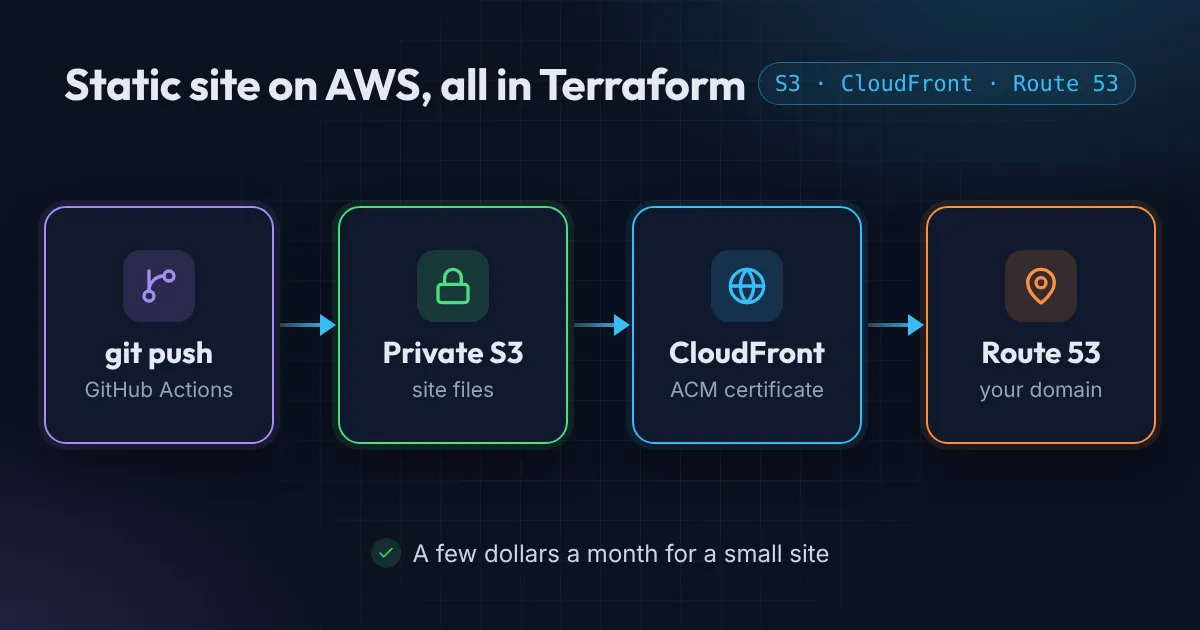
This website is plain static files sitting in an S3 bucket, served worldwide through CloudFront over HTTPS. It costs close to nothing to run, survives any amount of traffic, and every piece of it is defined in Terraform.
Here is the full setup and why each piece is there.
The S3 and CloudFront architecture in Terraform
Visitor ──HTTPS──▶ CloudFront ──(signed, OAC)──▶ private S3 bucket
                     │
         ACM certificate (us-east-1)
                     │
      Route 53: example.com + www → CloudFront (A + AAAA alias)
The important decisions:
- The bucket is private. No “static website hosting”, no public bucket policy. Only CloudFront can read it.
- CloudFront uses Origin Access Control (OAC), the modern replacement for Origin Access Identity.
- The certificate lives in
us-east-1. CloudFront only accepts ACM certificates from that region, whatever region the rest of your stack is in. wwwredirects to the apex domain, using a tiny CloudFront Function rather than a second bucket.
Prerequisites
- A Route 53 hosted zone for your domain, with the registrar’s name servers pointing to it.
- Terraform with the AWS provider 5.x.
- A remote state backend (I cover that in Terraform remote state on S3 with KMS).
New AWS account? CloudFront may refuse to create a distribution with “Your account must be verified before you can add new CloudFront resources.” That’s an account-level block, not a Terraform problem. Open a free Account and billing case with AWS Support and include the error. It usually clears within a day or two.
The private S3 bucket
resource "aws_s3_bucket" "website" {
  bucket = var.domain_name
}

resource "aws_s3_bucket_ownership_controls" "website" {
  bucket = aws_s3_bucket.website.id
  rule { object_ownership = "BucketOwnerEnforced" }
}

resource "aws_s3_bucket_public_access_block" "website" {
  bucket                  = aws_s3_bucket.website.id
  block_public_acls       = true
  block_public_policy     = true
  ignore_public_acls      = true
  restrict_public_buckets = true
}

resource "aws_s3_bucket_versioning" "website" {
  bucket = aws_s3_bucket.website.id
  versioning_configuration { status = "Enabled" }
}
Versioning lets you roll back a bad deploy. Add a lifecycle rule that expires noncurrent versions after 30 days so old files don’t pile up.
The certificate, validated through DNS
resource "aws_acm_certificate" "website" {
  domain_name               = var.domain_name
  subject_alternative_names = ["www.${var.domain_name}"]
  validation_method         = "DNS"
  lifecycle { create_before_destroy = true }
}

resource "aws_route53_record" "cert_validation" {
  for_each = {
    for dvo in aws_acm_certificate.website.domain_validation_options :
    dvo.domain_name => dvo
  }
  zone_id         = var.zone_id
  name            = each.value.resource_record_name
  type            = each.value.resource_record_type
  ttl             = 300
  records         = [each.value.resource_record_value]
  allow_overwrite = true
}

resource "aws_acm_certificate_validation" "website" {
  certificate_arn         = aws_acm_certificate.website.arn
  validation_record_fqdns = [for r in aws_route53_record.cert_validation : r.fqdn]
}
Because the hosted zone is in the same account, Terraform creates the validation records itself and waits until ACM issues the certificate. No clicking in the console.
A CloudFront Function for www and clean URLs
Two small problems to solve at the edge:
www.example.comshould permanently redirect toexample.com.- S3 doesn’t know that
/aboutmeans/about/index.html.
function handler(event) {
  var request = event.request;
  var host = request.headers.host.value;

  if (host.startsWith('www.')) {
    return {
      statusCode: 301,
      statusDescription: 'Moved Permanently',
      headers: { location: { value: 'https://' + host.substring(4) + request.uri } }
    };
  }

  var uri = request.uri;
  if (uri.endsWith('/')) {
    request.uri = uri + 'index.html';
  } else if (!uri.split('/').pop().includes('.')) {
    request.uri = uri + '/index.html';
  }
  return request;
}
CloudFront Functions run on every request at the edge and cost a fraction of Lambda@Edge. For a rewrite like this they’re the right tool.
The distribution
resource "aws_cloudfront_origin_access_control" "website" {
  name                              = "website-oac"
  origin_access_control_origin_type = "s3"
  signing_behavior                  = "always"
  signing_protocol                  = "sigv4"
}

resource "aws_cloudfront_distribution" "website" {
  enabled             = true
  is_ipv6_enabled     = true
  default_root_object = "index.html"
  aliases             = [var.domain_name, "www.${var.domain_name}"]
  price_class         = "PriceClass_100"

  origin {
    origin_id                = "s3-website"
    domain_name              = aws_s3_bucket.website.bucket_regional_domain_name
    origin_access_control_id = aws_cloudfront_origin_access_control.website.id
  }

  default_cache_behavior {
    target_origin_id       = "s3-website"
    viewer_protocol_policy = "redirect-to-https"
    allowed_methods        = ["GET", "HEAD", "OPTIONS"]
    cached_methods         = ["GET", "HEAD"]
    compress               = true
    cache_policy_id        = data.aws_cloudfront_cache_policy.caching_optimized.id

    function_association {
      event_type   = "viewer-request"
      function_arn = aws_cloudfront_function.website.arn
    }
  }

  # A private bucket returns 403 for missing keys, so map both to the 404 page
  custom_error_response {
    error_code         = 403
    response_code      = 404
    response_page_path = "/404.html"
  }

  restrictions {
    geo_restriction { restriction_type = "none" }
  }

  viewer_certificate {
    acm_certificate_arn      = aws_acm_certificate_validation.website.certificate_arn
    ssl_support_method       = "sni-only"
    minimum_protocol_version = "TLSv1.2_2021"
  }
}
Two details people often miss:
- Use
bucket_regional_domain_name, not the S3 website endpoint. OAC only works with the REST endpoint. - Map 403 to your 404 page. Without
s3:ListBucket, S3 returns 403 (not 404) for missing objects, so visitors would see an ugly XML error.
The bucket policy: only this distribution
data "aws_iam_policy_document" "website_bucket" {
  statement {
    actions   = ["s3:GetObject"]
    resources = ["${aws_s3_bucket.website.arn}/*"]
    principals {
      type        = "Service"
      identifiers = ["cloudfront.amazonaws.com"]
    }
    condition {
      test     = "StringEquals"
      variable = "AWS:SourceArn"
      values   = [aws_cloudfront_distribution.website.arn]
    }
  }
}
The AWS:SourceArn condition matters: without it, any CloudFront distribution in any account could read your bucket.
DNS records
resource "aws_route53_record" "website" {
  for_each = toset(["A", "AAAA"])
  zone_id  = var.zone_id
  name     = var.domain_name
  type     = each.key

  alias {
    name                   = aws_cloudfront_distribution.website.domain_name
    zone_id                = aws_cloudfront_distribution.website.hosted_zone_id
    evaluate_target_health = false
  }
}
Repeat for www. Alias records are free in Route 53 and resolve straight to CloudFront’s IPs.
What it costs
For a personal or small business site the bill is tiny: the hosted zone is $0.50/month, ACM certificates are free, and CloudFront’s free tier covers a large amount of traffic each month. S3 storage for a static site is a few cents. For a small site that adds up to roughly a dollar a month, plus the yearly cost of the domain name itself.
Deploying content
Infrastructure is half the job. The other half is getting files into the bucket without storing AWS keys in GitHub. That’s the next post: Deploy to AWS from GitHub Actions without access keys.
Want this set up for your team?
I build this kind of infrastructure for startups and small teams, with fixed prices and full handover.