Deploy to AWS from GitHub Actions without access keys (OIDC)
Stop storing AWS keys in GitHub secrets. With GitHub Actions and AWS OIDC, each workflow run gets short-lived credentials for a locked-down IAM role.
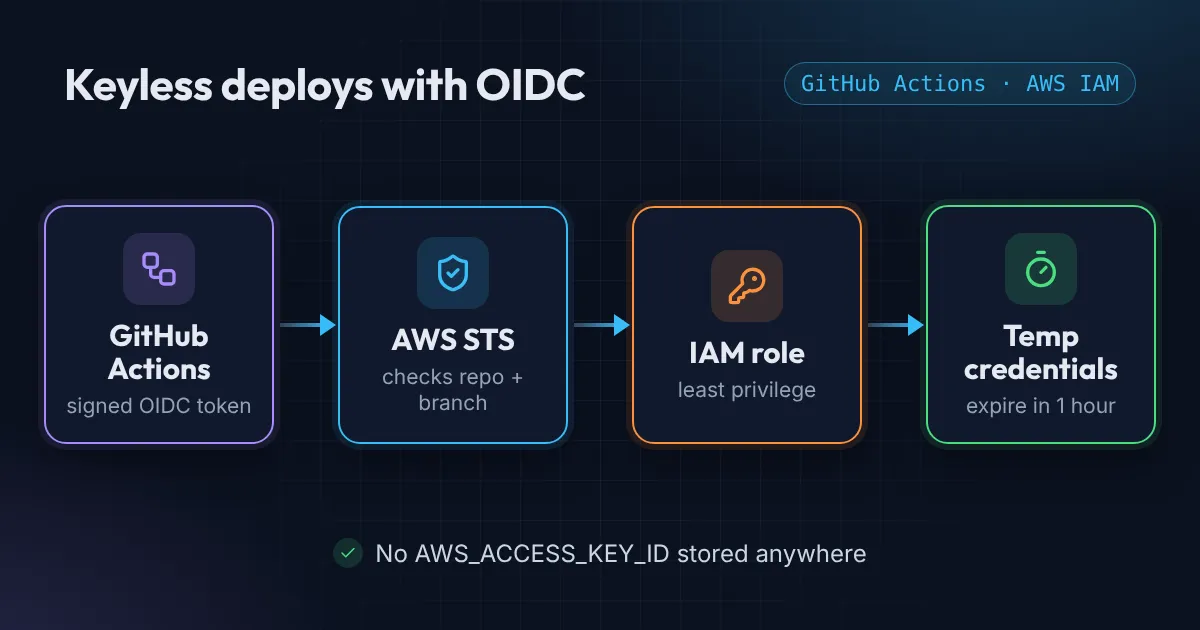
The classic way to deploy from GitHub Actions to AWS is an IAM user with an access key pasted into repository secrets. It works, but those keys never expire, they get copied around, and if they leak, someone has your AWS permissions until you notice.
GitHub Actions supports OpenID Connect (OIDC). Each workflow run gets a signed token from GitHub, AWS checks it, and hands back temporary credentials that expire within the hour. Nothing long-lived is stored anywhere.
This is how the site you’re reading gets deployed.
How GitHub Actions OIDC with AWS works
- You register GitHub as an identity provider in your AWS account (once per account).
- You create an IAM role whose trust policy says: only tokens from this repo, on this branch, may assume me.
- The workflow asks GitHub for a token and exchanges it for the role’s credentials using
aws-actions/configure-aws-credentials.
Step 1: the identity provider
resource "aws_iam_openid_connect_provider" "github" {
  url            = "https://token.actions.githubusercontent.com"
  client_id_list = ["sts.amazonaws.com"]
  thumbprint_list = [
    "6938fd4d98bab03faadb97b34396831e3780aea1",
    "1c58a3a8518e8759bf075b76b750d4f2df264fcd",
  ]
}
An AWS account can only have one provider per URL. If another project already created it, look it up with a data "aws_iam_openid_connect_provider" block instead of creating a second one.
Step 2: a role only your repo can use
data "aws_iam_policy_document" "deploy_trust" {
  statement {
    actions = ["sts:AssumeRoleWithWebIdentity"]
    principals {
      type        = "Federated"
      identifiers = [aws_iam_openid_connect_provider.github.arn]
    }
    condition {
      test     = "StringEquals"
      variable = "token.actions.githubusercontent.com:aud"
      values   = ["sts.amazonaws.com"]
    }
    condition {
      test     = "StringLike"
      variable = "token.actions.githubusercontent.com:sub"
      values   = ["repo:my-user/my-website:ref:refs/heads/main"]
    }
  }
}

resource "aws_iam_role" "deploy" {
  name               = "GitHub_S3_Deploy_Role"
  assume_role_policy = data.aws_iam_policy_document.deploy_trust.json
}
The sub condition is the whole security model. It pins the role to one repository and one branch. Never use repo:* or repo:my-user/* here unless you really mean every repo you own.
Step 3: least-privilege permissions
For a static site the role needs to sync files and clear the CloudFront cache, nothing more:
resource "aws_iam_policy" "deploy" {
  name = "CICD_S3_Deployment_Policy"
  policy = jsonencode({
    Version = "2012-10-17"
    Statement = [
      {
        Effect   = "Allow"
        Action   = ["s3:PutObject", "s3:DeleteObject", "s3:GetObject"]
        Resource = "arn:aws:s3:::example.com/*"
      },
      {
        Effect   = "Allow"
        Action   = ["s3:ListBucket"]
        Resource = "arn:aws:s3:::example.com"
      },
      {
        Effect   = "Allow"
        Action   = ["cloudfront:CreateInvalidation", "cloudfront:GetInvalidation"]
        Resource = "arn:aws:cloudfront::${data.aws_caller_identity.current.account_id}:distribution/*"
      }
    ]
  })
}

resource "aws_iam_role_policy_attachment" "deploy" {
  role       = aws_iam_role.deploy.name
  policy_arn = aws_iam_policy.deploy.arn
}
Note that s3:ListBucket targets the bucket ARN while object actions target bucket/*. Mixing those up is the most common cause of AccessDenied on aws s3 sync.
Step 4: the workflow
name: Deploy

on:
  push:
    branches: [main]

permissions:
  contents: read

jobs:
  deploy:
    runs-on: ubuntu-latest
    permissions:
      id-token: write   # lets the job request an OIDC token
      contents: read
    steps:
      - uses: actions/checkout@v4

      - uses: aws-actions/configure-aws-credentials@v4
        with:
          role-to-assume: ${{ vars.AWS_ROLE_ARN }}
          aws-region: us-east-1

      - run: aws s3 sync ./dist "s3://${{ vars.S3_BUCKET }}" --delete

      - run: |
          aws cloudfront create-invalidation \
            --distribution-id "${{ vars.CLOUDFRONT_DISTRIBUTION_ID }}" \
            --paths "/*"
The role ARN, bucket name and distribution ID aren’t secrets, so they go in repository variables, not secrets. The repo ends up with zero AWS secrets.
Gotchas I hit
Not authorized to perform sts:AssumeRoleWithWebIdentity
The token’s sub didn’t match the trust policy. Check the owner and repo name spelling (including case) and the branch.
Adding environment: production broke the deploy.
When a job uses a GitHub environment, the token’s subject changes from repo:owner/repo:ref:refs/heads/main to repo:owner/repo:environment:production. Either drop the environment or add that subject to the trust policy.
Pull requests can’t deploy, and that’s correct.
PR runs have a different subject, so they’re rejected by the role. Run tests on PRs, deploy only from main.
Why bother?
- No long-lived keys to rotate or leak.
- Each run’s credentials expire on their own.
- CloudTrail shows exactly which repo and run assumed the role.
- Removing access is one Terraform change.
If you’re still pasting access keys into CI, this is one of the cheapest security wins available.
Once the role exists, paste its trust policy into the free AWS policy checker. It flags a GitHub OIDC trust with no sub condition, or a wildcard that lets every repository in your organisation assume the role.
Next, read 3 AWS IAM mistakes I find in almost every account to tighten the rest of your IAM setup, or why your GitHub Actions pipeline is slow to speed up the workflow itself. If you want this built for you, see the CI/CD Pipeline package.
Want this set up for your team?
I build this kind of infrastructure for startups and small teams, with fixed prices and full handover.