S3 Block Public Access: why a bucket should never be public
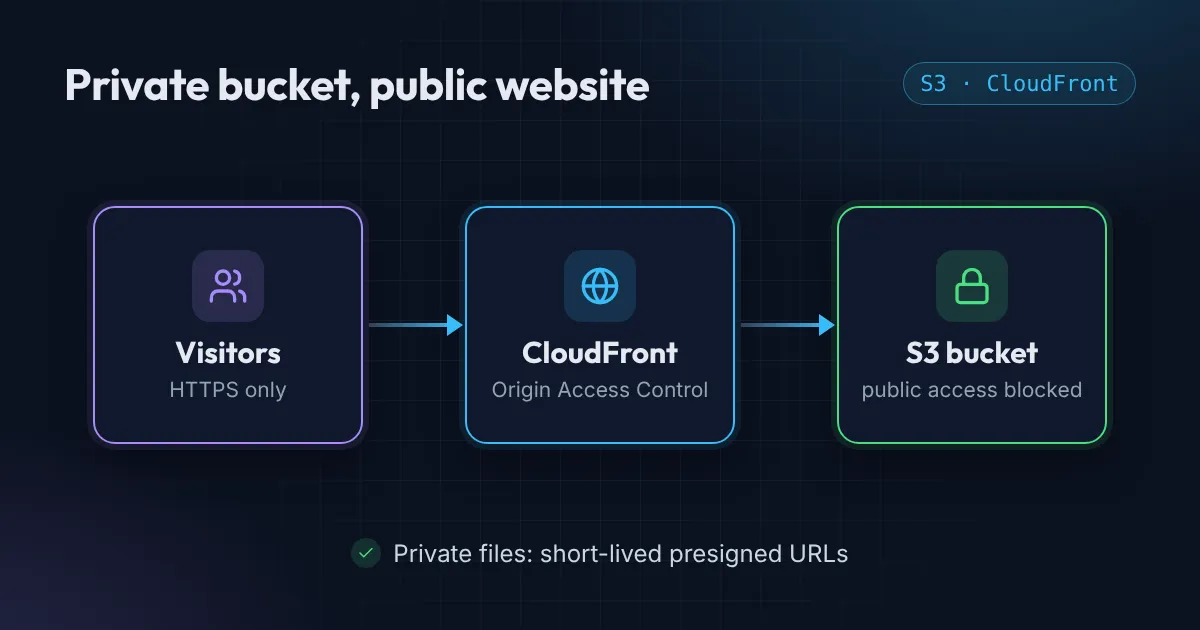
Public S3 buckets keep making headlines. My three-step setup instead: S3 Block Public Access, CloudFront with Origin Access Control, presigned URLs.
Every few months a company you have heard of leaks customer data, and the cause is the same boring thing: someone made an S3 bucket public “just for now”.
Nobody means to leave it that way. The site needed images, the console had a friendly toggle, and it worked. Then the bucket sat there for two years while the team moved on.
The fix is not “be more careful”. The fix is to make public access impossible, and still serve your files fast. Here is how I set that up in about ten minutes.
Step 1: Turn on S3 Block Public Access
This is a single switch that overrides every bucket policy and ACL underneath it. Even if a teammate pastes a wildly permissive policy later, S3 ignores the public part.
resource "aws_s3_bucket_public_access_block" "site" {
  bucket                  = aws_s3_bucket.site.id
  block_public_acls       = true
  block_public_policy     = true
  ignore_public_acls      = true
  restrict_public_buckets = true
}
Think of it as a lock on the front door that cannot be propped open. New AWS accounts now enable it by default on new buckets, but I still declare it in Terraform so it is written down and reviewed.
Step 2: Serve through CloudFront with Origin Access Control
“But my website needs to be public!” Your website does. Your bucket does not.
Put CloudFront in front and give it, and only it, permission to read the bucket. That permission is called Origin Access Control (OAC). Visitors talk to CloudFront. CloudFront talks to S3. Nobody can bypass CloudFront and hit the bucket directly.
data "aws_iam_policy_document" "site" {
  statement {
    actions   = ["s3:GetObject"]
    resources = ["${aws_s3_bucket.site.arn}/*"]

    principals {
      type        = "Service"
      identifiers = ["cloudfront.amazonaws.com"]
    }

    condition {
      test     = "StringEquals"
      variable = "AWS:SourceArn"
      values   = [aws_cloudfront_distribution.site.arn]
    }
  }
}
The SourceArn condition is the important line. It says: only this distribution, not any CloudFront distribution in the world.
You get two bonuses for free: HTTPS with your own domain, and a global cache that makes the site faster and cheaper than serving from S3 directly.
Step 3: Presigned URLs for private files
Not everything belongs on a website. Invoices, user uploads, backups, exports. For these, keep the bucket private and hand out presigned URLs: links that carry a temporary signature and expire after a few minutes.
import boto3

s3 = boto3.client("s3")
url = s3.generate_presigned_url(
    "get_object",
    Params={"Bucket": "my-private-bucket", "Key": "invoices/2026-09.pdf"},
    ExpiresIn=300,  # five minutes
)
The link works for the person you gave it to, for five minutes, and then it is just a dead string. If it leaks into a chat or a log file, the damage is limited by the clock.
The checklist
Before you close the tab, run through this:
- Block Public Access is on, at the account level and the bucket level.
- The bucket policy only names CloudFront (with the distribution ARN) or specific IAM roles.
- Private files are shared through short-lived presigned URLs, never public links.
- All of the above is in Terraform, so a change shows up in a pull request instead of a console click nobody remembers.
Want it as a printable list you can tick off per bucket? Grab the S3 security checklist.
If your current setup fails any of those, it is worth an afternoon. I have fixed this exact thing for clients more than once, and it is usually a cheap change with an outsized security payoff.
Want the 45-second version? I covered it in a YouTube Short. And if you would rather have someone audit your buckets for you, get in touch.
Want this set up for your team?
I build this kind of infrastructure for startups and small teams, with fixed prices and full handover.