Terraform S3 backend: remote state with KMS and state locking
Set up a Terraform S3 backend for remote state: an encrypted, versioned bucket with a KMS key, native state locking, and a clean layout per environment.
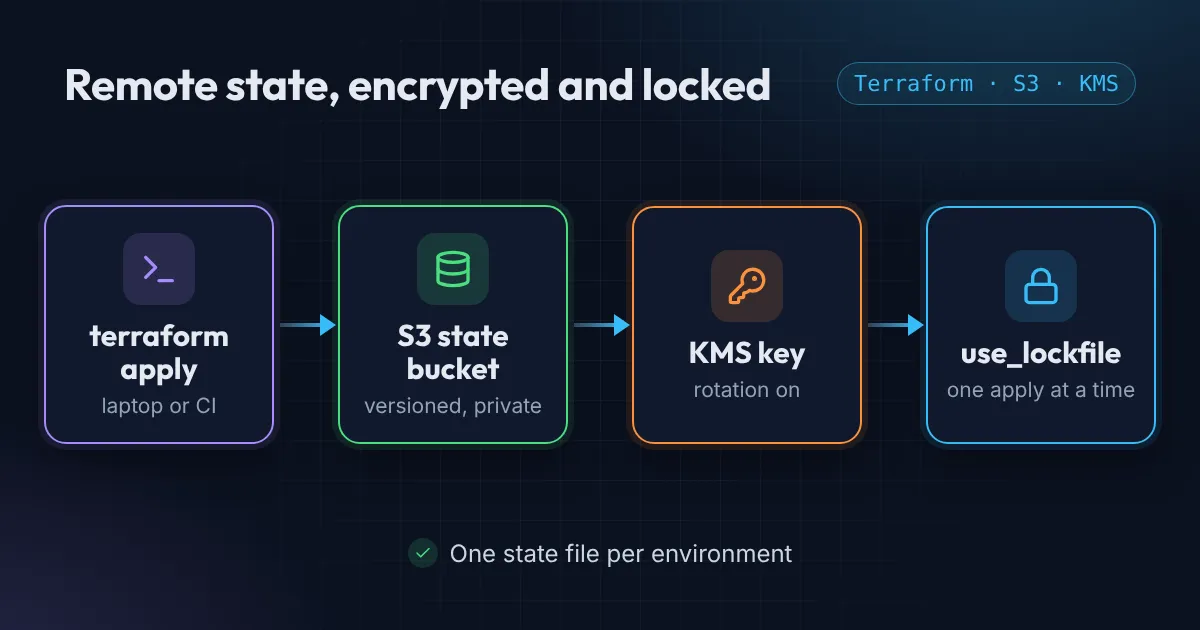
Terraform state is the record of everything Terraform manages. If it lives in a terraform.tfstate file on your laptop, you have three problems: nobody else can run Terraform, a lost laptop means lost state, and the file can contain secrets in plain text. Terraform remote state on S3 fixes all three.
The fix is a remote backend. On AWS that means an S3 bucket, and the setup below is the one I use for this site and for client projects.
Local state vs Terraform S3 backend
| Question | Local terraform.tfstate |
S3 backend |
|---|---|---|
| Who can run Terraform | Only the person with the file | Anyone (or any pipeline) with access |
| Lost laptop or disk | State gone | Nothing lost |
| Two applies at once | Nothing stops them | Blocked by the lock file |
| Undo a bad write | Only if you kept a copy | Restore an older object version |
| Secrets in state | Plain text on a laptop | Encrypted at rest, access by IAM |
| Cost | Free | A few cents a month for a small project |
The folder layout
infrastructure/
├── backend/                     # creates the state bucket (local state, run once)
├── modules/
│   ├── route53/
│   ├── s3_website/
│   └── iam/
└── environment/
    └── us-east-1/
        └── global/              # uses the S3 backend, calls modules
The backend folder is the chicken-and-egg piece: it creates the bucket that every other folder stores its state in. It’s the only thing that keeps local state, and it rarely changes.
Step 1: the S3 bucket for Terraform remote state
data "aws_caller_identity" "current" {}

resource "aws_s3_bucket" "state" {
  bucket        = "${var.project_name}-state-bucket"
  force_destroy = false
}

resource "aws_s3_bucket_versioning" "state" {
  bucket = aws_s3_bucket.state.id
  versioning_configuration { status = "Enabled" }
}

resource "aws_s3_bucket_public_access_block" "state" {
  bucket                  = aws_s3_bucket.state.id
  block_public_acls       = true
  block_public_policy     = true
  ignore_public_acls      = true
  restrict_public_buckets = true
}
Versioning is not optional. If a bad apply or a merge conflict corrupts the state, you restore the previous version of the object and you’re back in business.
Step 2: a dedicated KMS key
S3 encrypts everything by default with S3-managed keys. A customer-managed KMS key adds two things: an audit trail of every decrypt in CloudTrail, and a key policy you control.
resource "aws_kms_key" "state" {
  description         = "Terraform state bucket key"
  enable_key_rotation = true

  policy = jsonencode({
    Version = "2012-10-17"
    Statement = [
      {
        Sid       = "AccountAdmin"
        Effect    = "Allow"
        Principal = { AWS = "arn:aws:iam::${data.aws_caller_identity.current.account_id}:root" }
        Action    = "kms:*"
        Resource  = "*"
      },
      {
        Sid       = "AllowS3"
        Effect    = "Allow"
        Principal = { Service = "s3.amazonaws.com" }
        Action    = ["kms:Encrypt", "kms:Decrypt", "kms:ReEncrypt*", "kms:GenerateDataKey*", "kms:DescribeKey"]
        Resource  = "*"
        Condition = { StringEquals = { "kms:ViaService" = "s3.${var.region}.amazonaws.com" } }
      }
    ]
  })
}

resource "aws_kms_alias" "state" {
  name          = "alias/${var.project_name}-state-bucket-key"
  target_key_id = aws_kms_key.state.id
}

resource "aws_s3_bucket_server_side_encryption_configuration" "state" {
  bucket = aws_s3_bucket.state.id
  rule {
    apply_server_side_encryption_by_default {
      kms_master_key_id = aws_kms_key.state.arn
      sse_algorithm     = "aws:kms"
    }
    bucket_key_enabled = true
  }
}
bucket_key_enabled cuts KMS request costs dramatically by letting S3 reuse a bucket-level data key. Turn it on.
SSE-S3 or a KMS key?
| Feature | SSE-S3 (default) | Customer-managed KMS key |
|---|---|---|
| Encrypted at rest | Yes | Yes |
| Who can decrypt | Anyone with S3 read access | Only principals the key policy allows |
| CloudTrail record of each decrypt | No | Yes |
| Cost | Free | About $1 a month per key plus requests (KMS pricing) |
For a side project SSE-S3 is fine. For anything with client data or a compliance requirement, use the KMS key: it is the difference between “the bucket is encrypted” and “we can show who read it”.
Apply this folder once:
cd backend
terraform init
terraform apply
Keep the resulting local terraform.tfstate safe (and out of Git). It only describes the bucket and key.
Step 3: configure the Terraform S3 backend in each environment
terraform {
  required_providers {
    aws = { source = "hashicorp/aws", version = "~> 5.0" }
  }

  backend "s3" {
    bucket       = "myproject-state-bucket"
    key          = "us-east-1/global/terraform.tfstate"
    region       = "us-east-1"
    encrypt      = true
    use_lockfile = true
  }
}
Each environment gets its own key, so a mistake in staging can never overwrite production’s state.
About locking
Locking stops two people (or two pipelines) running apply at the same time. Historically this needed a DynamoDB table, and HashiCorp has now deprecated DynamoDB locking. Since Terraform 1.10, the S3 backend can lock natively with use_lockfile = true: it writes a small .tflock object next to the state. No extra table to create or pay for. If you’re on an older Terraform version, either upgrade or use the dynamodb_table argument. Every backend option is in HashiCorp’s S3 backend reference. If a lock ever gets stuck, here is how to force-unlock Terraform state safely.
Moving off DynamoDB? Set both for a while, so old and new Terraform versions respect the same lock, then remove dynamodb_table and the table:
backend "s3" {
  bucket         = "myproject-state-bucket"
  key            = "us-east-1/global/terraform.tfstate"
  region         = "us-east-1"
  encrypt        = true
  use_lockfile   = true
  dynamodb_table = "terraform-locks" # remove once everyone is on 1.10+
}
Move existing local state into the S3 backend
If the project already has a local terraform.tfstate, add the backend block and run:
terraform init -migrate-stateTerraform asks before it copies the local state to the bucket. Answer yes, then run terraform plan: it should report no changes. If it wants to create everything again, stop: the state did not move, and nothing should be applied until it has. Keep the old local file until you have confirmed this.
One backend block, many environments
Hard-coding the key works for one environment. With several, keep the shared settings in the code and pass the per-environment part at init time (a partial configuration):
terraform {
  backend "s3" {
    bucket       = "myproject-state-bucket"
    region       = "us-east-1"
    encrypt      = true
    use_lockfile = true
  }
}
# backend/prod.hcl
key = "us-east-1/prod/terraform.tfstate"terraform init -backend-config=backend/prod.hclKeep credentials out of these files: use your AWS profile or the pipeline’s OIDC role, because values passed with -backend-config are written into the .terraform folder and plan files.
IAM permissions the Terraform S3 backend needs
The role that runs Terraform needs only this on the state, as listed in the S3 backend reference:
{
  "Version": "2012-10-17",
  "Statement": [
    { "Effect": "Allow", "Action": "s3:ListBucket",
      "Resource": "arn:aws:s3:::myproject-state-bucket" },
    { "Effect": "Allow", "Action": ["s3:GetObject", "s3:PutObject"],
      "Resource": "arn:aws:s3:::myproject-state-bucket/us-east-1/global/terraform.tfstate" },
    { "Effect": "Allow", "Action": ["s3:GetObject", "s3:PutObject", "s3:DeleteObject"],
      "Resource": "arn:aws:s3:::myproject-state-bucket/us-east-1/global/terraform.tfstate.tflock" },
    { "Effect": "Allow", "Action": ["kms:Encrypt", "kms:Decrypt", "kms:GenerateDataKey"],
      "Resource": "arn:aws:kms:us-east-1:111122223333:key/YOUR-KEY-ID" }
  ]
}
Scope it per environment, so the staging pipeline cannot write production’s state. Paste a policy into the IAM policy checker to spot anything broader than this.
Step 4: keep secrets out of Git
*.tfstate
*.tfstate.*
.terraform/
*.tfvars
*.tfplan
Commit .terraform.lock.hcl, though. It pins provider versions so everyone gets the same build.
A Makefile to avoid typos
GLOBAL_DIR = environment/us-east-1/global

plan-global:
	@terraform fmt --recursive
	@cd $(GLOBAL_DIR) && terraform init && terraform plan --var-file terraform.tfvars

apply-global:
	@cd $(GLOBAL_DIR) && terraform apply --var-file terraform.tfvars
make plan-global is harder to get wrong than remembering which folder you’re in.
Checklist
- Bucket versioned, public access blocked
- Customer-managed KMS key with rotation
- One state key per environment
- Locking enabled (use_lockfile, not DynamoDB)
- Existing local state migrated with -migrate-state, plan shows no changes
- IAM access to the state scoped per environment
- State and tfvars ignored in Git
With this in place you can move Terraform into CI, share it with a team, and sleep better.
Stuck on “Error acquiring the state lock” or need to roll back? Read how to unlock Terraform state and recover it. For more pitfalls, read 3 Terraform mistakes that cost me hours. If you want this set up for you, see the AWS Foundation package.
Common questions
Do I still need a DynamoDB table for Terraform state locking?
No. Since Terraform 1.10 the S3 backend locks natively with use_lockfile = true, and HashiCorp has deprecated DynamoDB locking. To migrate, set use_lockfile and dynamodb_table together for a while, then remove dynamodb_table.
Is Terraform state in S3 encrypted by default?
Yes. S3 encrypts new objects with S3-managed keys by default. A customer-managed KMS key adds a key policy you control and a CloudTrail record of every decrypt, for about a dollar a month per key.
How do I move existing local state into the S3 backend?
Add the backend block and run terraform init -migrate-state. Terraform asks before copying the local state to the bucket. Run terraform plan afterwards: it should show no changes.
Can several projects share one state bucket?
Yes, as long as every project and environment uses its own key (path) in the bucket. Separate buckets per account are cleaner when teams or AWS accounts differ.
What permissions does the Terraform S3 backend need?
s3:ListBucket on the bucket, s3:GetObject and s3:PutObject on the state key, s3:GetObject, s3:PutObject and s3:DeleteObject on the .tflock file, and kms:Encrypt, kms:Decrypt and kms:GenerateDataKey on the KMS key if you use one.
Want this set up for your team?
I build this kind of infrastructure for startups and small teams, with fixed prices and full handover.